Usage & plans
Each organization has a monthly quota of AI replies. The Usage page tells you how much you have used and how much is left.
On this page1/4 · What draws from the quota, and what does not
Key terms
- AI reply
- One answer generated by the AI. An answer split into several bubbles still counts once.
- Extra-message pool
- Replies you bought on top of your plan. The system only draws on this once the plan quota is spent. The pool carries forward and never expires: whatever you do not use this month is still there next month.
This is the question that costs money, so it comes first. Repio only counts replies the AI generates. One reply is one unit, if the AI splits it into three chat bubbles, or attaches an image to it, that is still one unit.
| Feature / Activity | Quota usage | Details |
|---|---|---|
| Direct customer chat in inbox | Counts | Every reply the AI writes to a customer in the inbox. |
| Follow-up with AI-guided template | Counts | Every follow-up step using an AI-guided template, since the AI writes that message per customer. |
| Automated Facebook comment replies | Counts | Includes both public replies to post comments and the initial private direct message generated by the AI. |
| Staff manual replies | Free | Messages your staff type, however long. |
| Follow-up with fixed template | Free | Follow-up steps using a fixed template, since the wording already exists. |
| Testing in Conversation Preview | Free | Testing in the conversation preview. Try as much as you like. |
Tip: The practical budgeting consequence: your quota is spent almost entirely on AI replies in the inbox. To estimate, take the conversation count from Reports and multiply by the average number of AI replies per conversation.
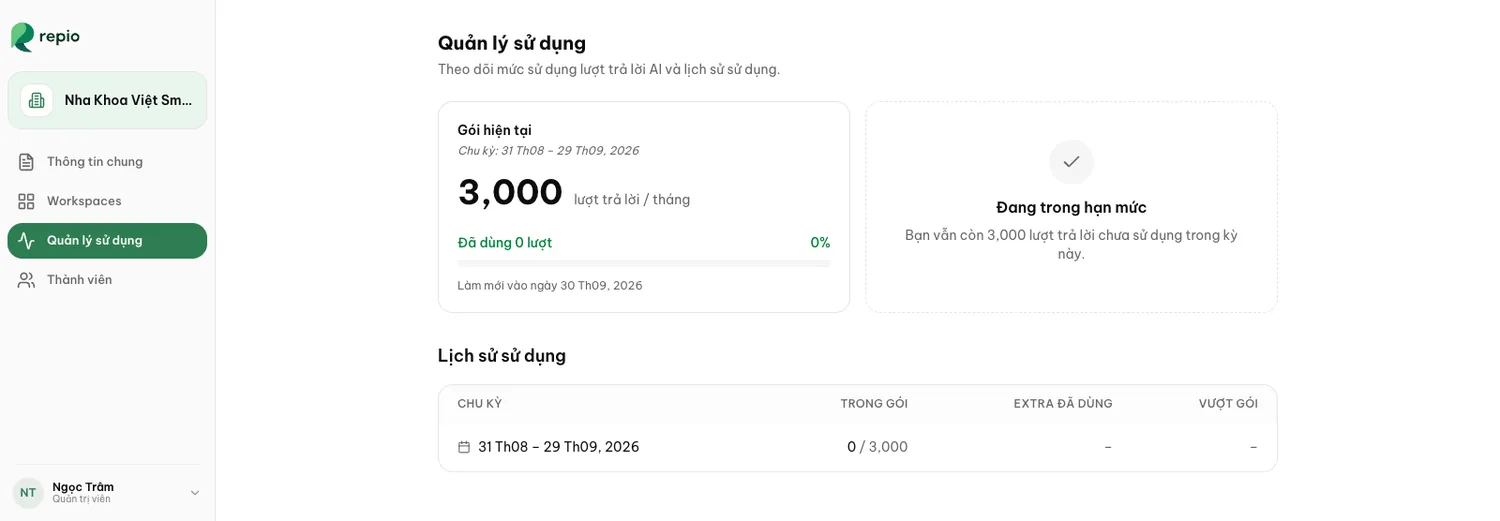
Open Organization settings → Usage
Only Owners and Admins have permission to view organization quota and plan details.
Check the Current plan card
It shows your current billing cycle dates, total quota (in replies / month), used replies with percentage, and reset date.
Review the quota status card
The adjacent card shows current status (e.g. Within quota) and remaining unused replies for the period.
Track the Usage history table
The table displays the last 12 cycles across four columns: CYCLE, IN PLAN, EXTRAS USED, and OVERAGE.
Tip: Repio draws in this exact order: the plan’s included quota first, then your purchased-extra balance, and only then billable overage. That way replies you already paid for are never wasted.
- Within quota: replies remain in the plan; everything runs normally.
- Using purchased extras: the plan quota is spent, so Repio draws from your purchased extra-reply balance.
- Billable overage: on plans that allow it: the AI keeps replying, and the extra replies are recorded as billable usage.
- AI paused: only on plans that do not allow overage, once both the plan quota and the extras are gone. The AI stops replying, but your staff can still message customers as usual.
Note: Only plans without overage pause. When that happens, new conversations route straight to staff with the reason “monthly AI quota exhausted”. The plan’s name shows on the Current plan card of the usage page, but whether it allows overage is not stated in the app, ask the Repio team at hello@repio.io.
Plan prices, the price of extra replies, and the overage rate are not shown in the app. They sit in your organization’s own agreement. To upgrade, top up the extra-reply pool, or ask whether your plan allows overage, contact the Repio team:
Email: hello@repio.io · Hotline: 0933 898 048
Changes take effect within the current cycle, with no waiting for the next one.