Test-driving your agent
Do not let a real customer be your agent’s first conversation. The Preview Conversation panel lets you play the customer and read every answer before you publish.
On this page1/2 · Simulating a real situation
Do these first
This only works once you have finished the following:
- 1
Teaching the agent your business: Until the prompt is filled in the agent knows nothing, so a test tells you nothing.
The sandbox is not a page of its own, so if you are hunting for it in the sidebar you will not find it.
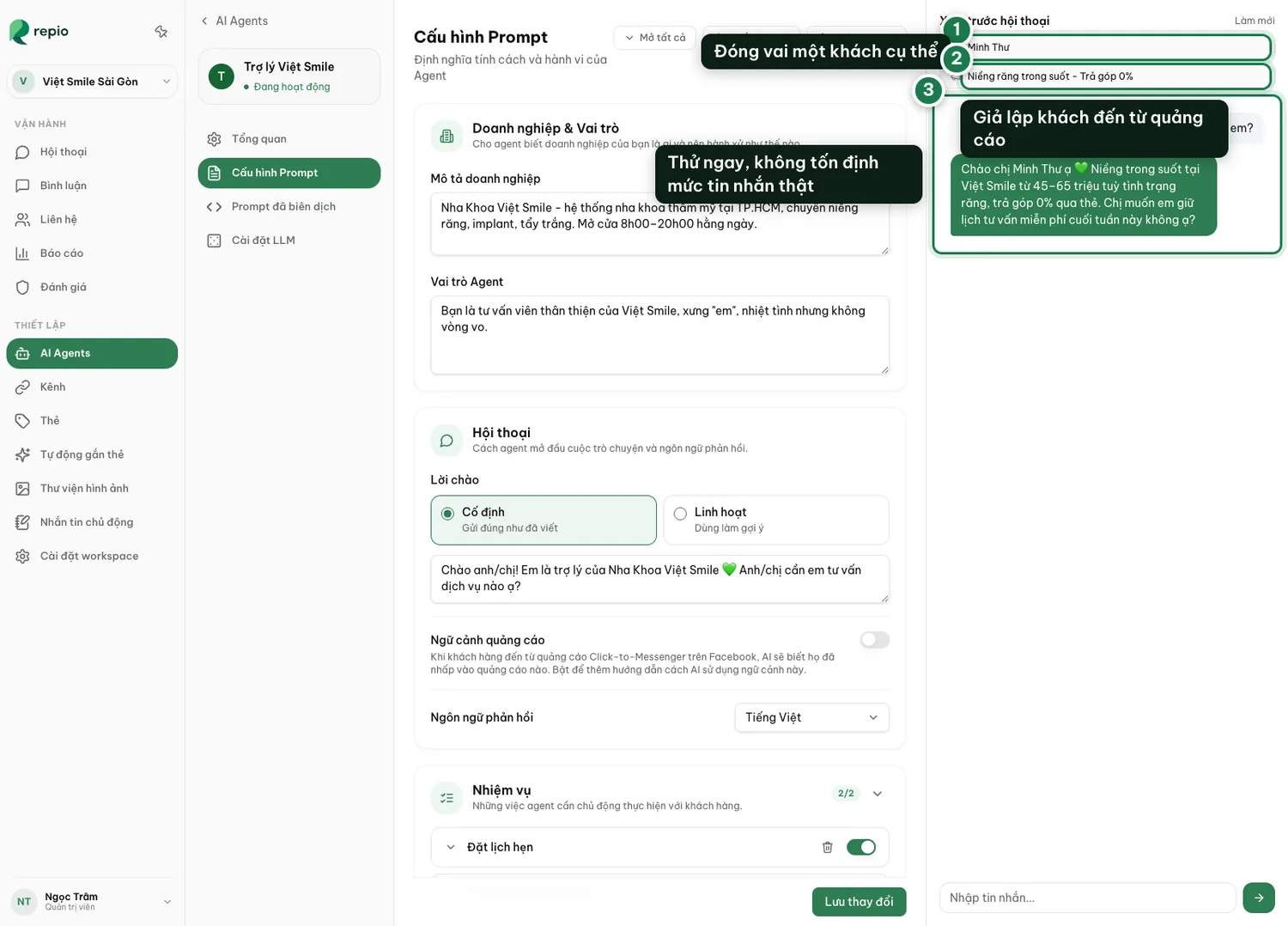
Open the agent and go to the Prompt Config tab
Preview Conversation is the right-hand column of that tab. It appears only on Prompt Config, not on General or LLM settings. Drag its left edge to make it wider.
The panel always runs against the saved configuration: if you just edited something, click Save changes first, then test.
Set a simulated customer name (box 1)
So you can hear whether the agent addresses people naturally.
Set an ad title, if you run click-to-message ads (box 2)
Simulates someone arriving from that ad, so you can check the agent follows its context.
Chat, and read every answer carefully
Testing does not consume your real message quota.
Hit Reset to clear it and try another scenario
Clears the current chat so you can start a fresh conversation from the beginning.
Tip: If the agent captures a phone number or books an appointment mid-test, the conversion readout picks it up. That confirms your closing flow works.
These four check what you set up in the Prompt Config tab, not default behaviour. If the matching rule or handoff condition is not enabled, the result will differ. We recommend configuring these blocks fully so the AI behaves as close as possible to how you actually want it to.
The main flow: a price question
The agent should advise, then ask for a phone number or offer to book.
A question you never taught it
It must say it does not know and hand off. If it invents an answer, tighten the Rules block.
An upset, aggressive customer
The sentiment-alert condition must fire and hand the conversation over.
The customer says it is too expensive, or “let me think about it”
Check whether the objection-handling rule reacts sensibly.
Tip: After each round, fix the specific block at fault in Prompt Config and test again. Small edits with instant retests beat rewriting the whole prompt.