Conversions API (CAPI)
The Conversions API sends conversion events from your conversations straight to Meta — for example when a customer leaves a phone number, books an appointment or completes a purchase. That lets Meta learn who actually converts and optimise your ads toward more people like them, and lets you measure each campaign’s results and ROAS. It is an advanced, optional capability for teams running Meta ads.
On this page1/4 · What the Conversions API is
Do these first
This only works once you have finished the following:
- 1
Connecting a Page for Marketing: CAPI uses the same Marketing connection to your Facebook Page — connect the Facebook Page and grant Marketing access first.
- 2
Accounts & roles: You need an Admin or Owner role to configure the dataset and choose when events are sent.
Key terms
- Conversions API (CAPI)
- A server-to-server channel that sends conversion events to Meta, so it can attribute and optimise ads even without a browser pixel.
- Dataset
- The Meta container (in Events Manager) that receives your events. Formerly usually called a Pixel.
- Conversion event
- A standard signal like Lead, Schedule or Purchase, mapped to a specific moment in the conversation.
Open Datasets (CAPI) in the Marketing & Conversion section (pick the Facebook Page first). It shares the same Marketing connection as Marketing Messages. Once it’s on, every time a conversation reaches a milestone you chose — a phone number left, an appointment booked, a purchase… — Repio sends an event to Meta.
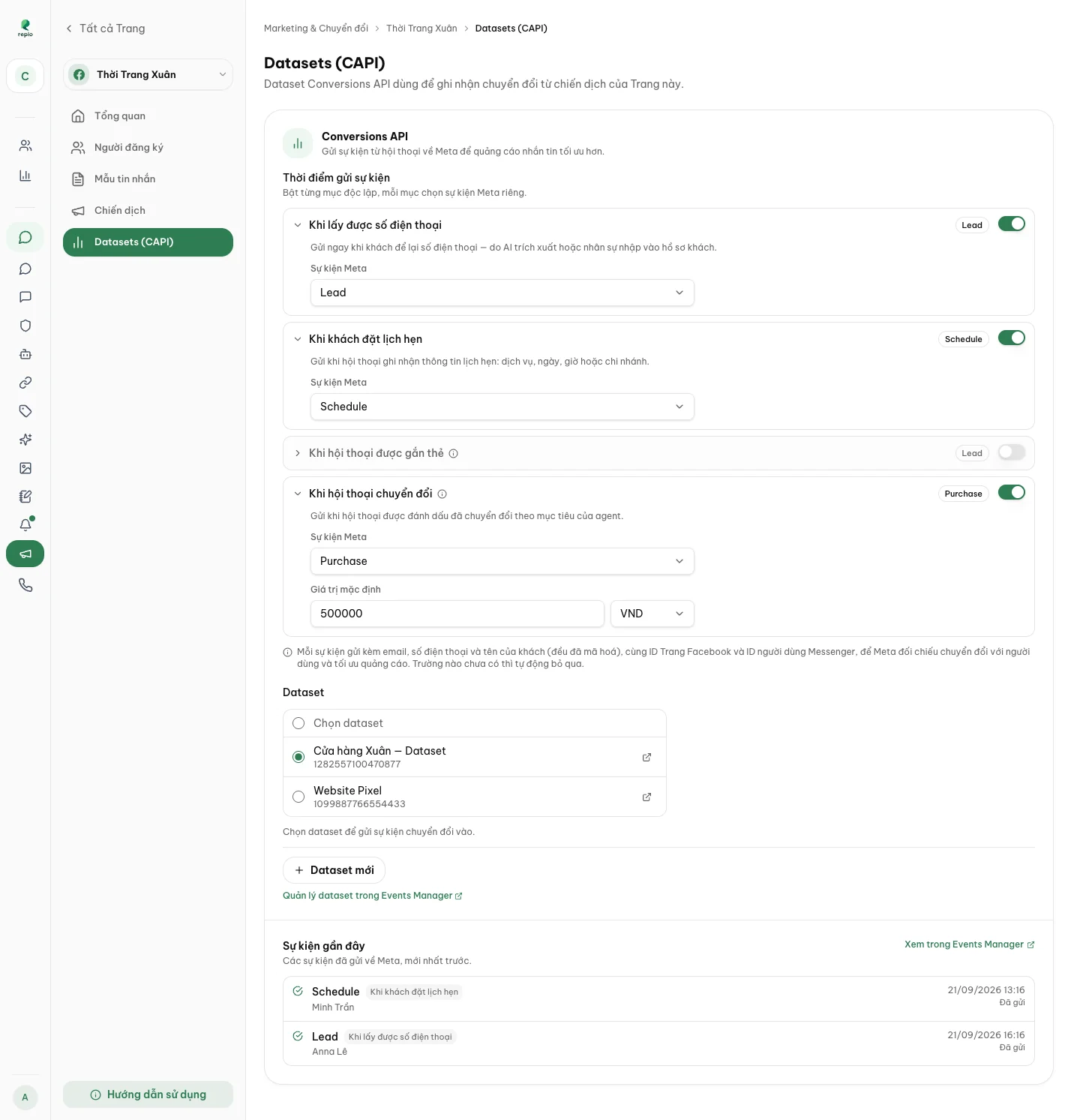
- Ad optimisation — Meta learns from who actually converts and targets more people like them.
- Measurement — conversions are attributed to the right campaign and show up in its insights.
- Privacy — each event carries the customer’s email, phone and name hashed; any field you don’t have is simply skipped.
Tip: Because CAPI runs server-to-server, it is immune to ad blockers, cookie restrictions, and mobile privacy features that might otherwise drop client-side events.
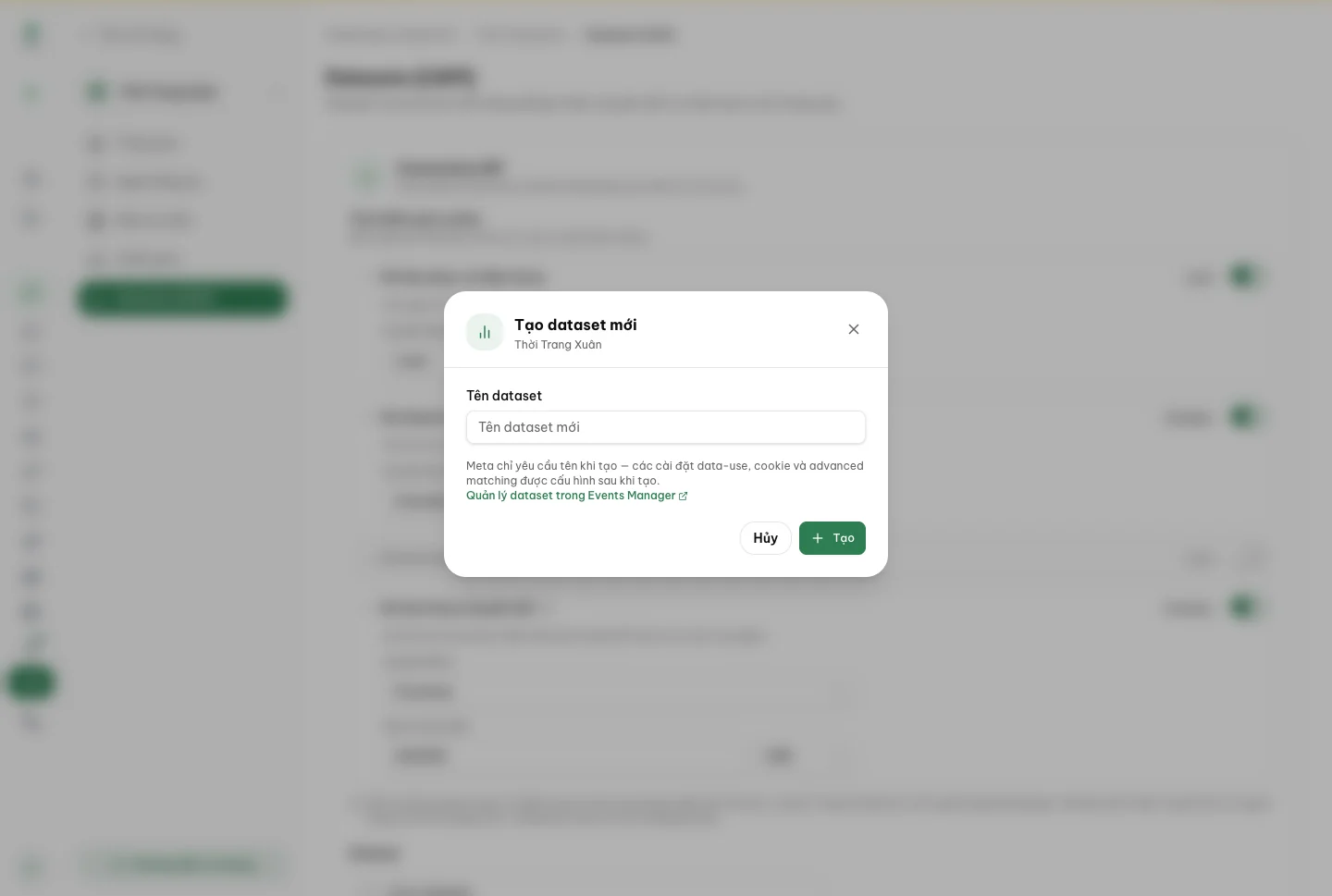
In the Dataset box, pick the dataset that will receive your events. If you don’t have one, click New dataset to create it without leaving Repio; advanced settings (data-use, cookie, advanced matching) are configured later in Events Manager.
Pick an existing dataset from the list.
The dataset choice saves the moment you pick it — no separate save step.
Or click New dataset.
Set a Dataset name and click Create.
Tip: Click Manage dataset in Events Manager any time to view advanced settings or matching rules on Meta.
Under When to send events, turn on each trigger independently and map it to a Meta event. For value-bearing events (like Purchase) you set a default value and currency.
- When a phone number is captured — usually Lead.
- When an appointment is booked — usually Schedule.
- When a conversation is tagged — pick a tag that counts as a conversion.
- When a conversation converts — when the AI marks the goal reached; usually Purchase with a value.
Tip: Value-bearing events send this default amount with each trigger so Meta can calculate campaign ROAS in Ads Manager.
The Recent events list shows every event sent to Meta, newest first — with the customer name, which trigger fired, and a Sent or Rejected status. It’s the quickest way to confirm CAPI is working. You can also click View in Events Manager to check aggregated stats on Meta.
Tip: After configuring, test by capturing a phone number or booking an appointment in a test conversation, then check back here after a few minutes to confirm the new event appears as Sent.